
Top rated
Live dictation
Any focused app
Talkesy for Mac & iPhone
Talkesy captures your voice on a hotkey, strips the fillers, and pastes clear writing into the app you already have open — about 5× faster than hunting for keys.
Also available for iOS
Listening
Live capture
Direct convert
um so like can you send the notes… wait actually by Friday?
Can you send the notes by Friday?
Speak
Hold hotkey & talk
Language
Auto-detect · 100+
Style
Clean & professional
Insert into
Any focused app
Tap to download free for macos · button adapts to your device
Everything you need to replace typing — cleanup, languages, and workflow tools in one voice layer.
Speak at the speed of thought. Talkesy turns messy speech into clear writing — about 4× faster than hunting for keys.
QWERTY keyboard
60wpm
Talkesy
240wpm
Save
1 day/week
Any focused app
Hold your hotkey and Talkesy types into the app in front of you — Slack, Notes, Docs, Cursor, and the rest. No plugins. Style mirrors how you usually write in that kind of app, so the text already feels like you.
Built for real writing
Auto cleanup
Talkesy strips fillers, hedges, and false starts while you hold the hotkey — so Slack, Notes, and Cursor get text that already sounds finished.
Um what's the plan for today um like just to confirm
What's the plan for today? Just to confirm.
Rework
Correct yourself while speaking and Talkesy throws out the discarded draft. Only the version you settled on gets pasted.
meet tomorrow at um 7 am oh actually
How about we meet tomorrow at 3 pm.
100+ languages
Dictate naturally — even mix languages — and paste phrasing that reads local. No separate translate step between thought and send.
Dictionary
Teach Talkesy product names, teammates, and jargon once. From then on it stops guessing and starts matching how your team actually writes.
Misheard → your spelling
Snippets
Say a private cue and expand bios, links, or status updates into the focused app — without hunting through another window.
Style
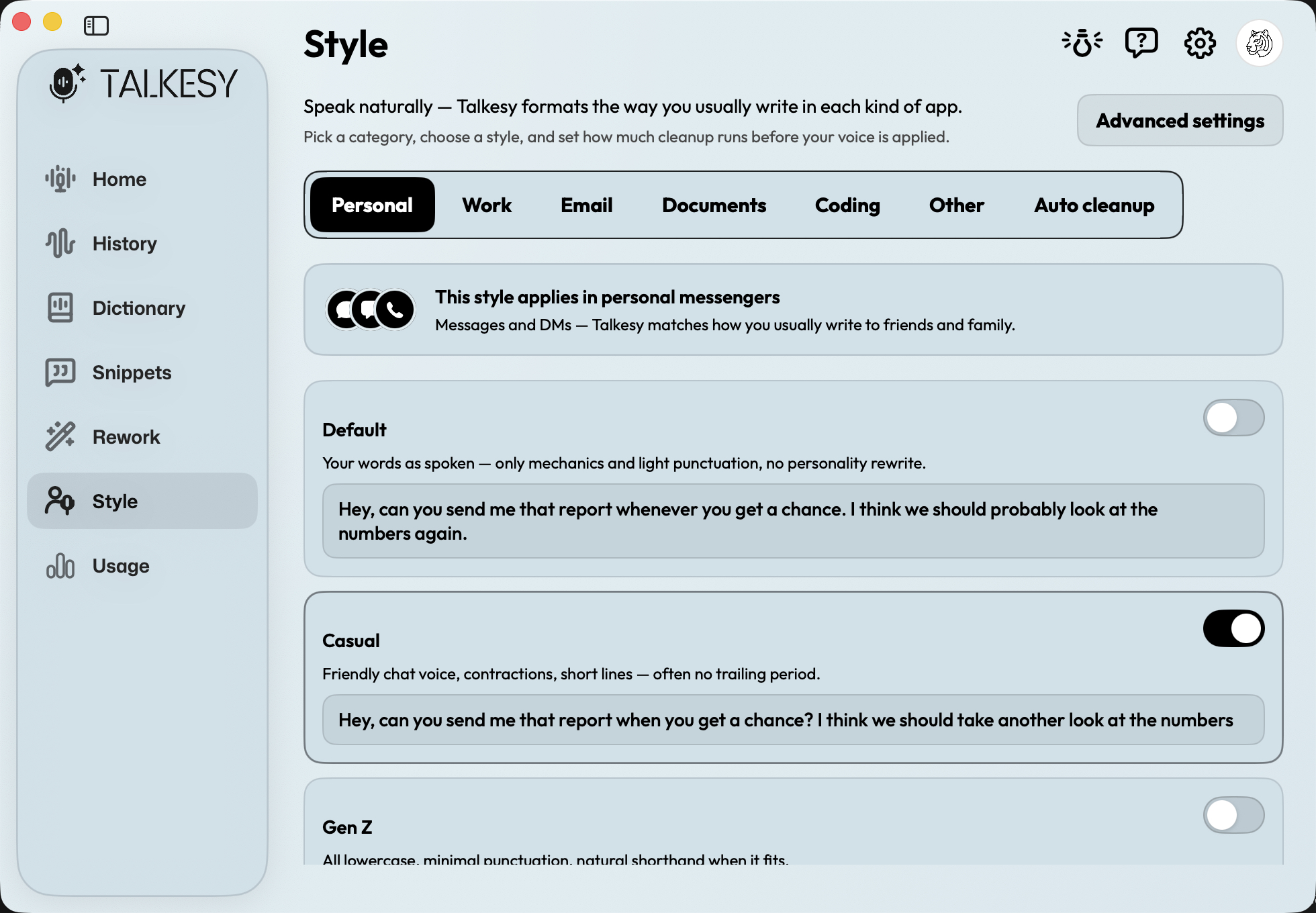
Casual in chat, crisp in email, steady in docs. Style adapts to how you usually write in each kind of app — Personal, Work, Coding, and more.
Personal result
hey — can you send that report when you get a chance? wanna double-check the numbers
Privacy first
Speed without handing your voice to a growth machine.
Voice recordings are never synced to your Talkesy account. Replay stays local.
Dictation history can remain on-device. You choose what is kept.
Speech is processed securely when you are signed in — no pasting your own AI keys.
Platforms, privacy, accuracy, and how Talkesy compares.
Still have a question? We're here to help.
Talkesy uses AI-powered voice recognition to convert speech to text in real time. Hold your hotkey, speak naturally, and cleaned text appears in whatever app is focused — email, Slack, Notes, Cursor, and more. Write about 5x faster while keeping your keyboard as an option.
Yes. Every account includes 3,000 words per month on the Free plan — no credit card required. Upgrade to Pro or Premium when you need more.
Talkesy is available for macOS and iOS. Download for Mac from this site, and get the iPhone app from the App Store. Open this page on your device and the download button will match your platform.
Talkesy uses state-of-the-art speech models for highly accurate transcription. Results depend on microphone quality, background noise, and speaking pace. Auto Cleanup removes fillers and mid-sentence corrections so the text reads like you wrote it.
Privacy is a core design choice. Audio is never synced to your Talkesy account — it stays on your device for local replay. Dictation history can remain on-device. Speech is processed securely when you are signed in. You control what is retained.
Click Download on this page for your device, install Talkesy, sign in with Apple or Google, allow Microphone and Accessibility, then hold your hotkey and speak into any app.
Yes. Set any activation hotkey that fits your workflow in Settings — including push-to-talk and hands-free start/stop.
Many people switch for the same high-accuracy flow with Talkesy’s native Mac feel, flexible Free/Pro/Premium word plans, and privacy-first defaults. If you want to replace typing without subscription fatigue, Talkesy is built for that.
MacWhisper is excellent for transcribing recorded audio files. Talkesy is optimized for live, real-time dictation directly into apps like Slack, Notion, and VS Code. If you want to replace your keyboard, Talkesy is the tool.
Free to start
Start free with 3,000 words a month. Download for your device and decide after a day of real work.
Also available for iOS